
Steroid_Kit
Steroid Flows›Overview
Steroid Flows — Overview
Steroid Flows is a visual automation engine that lets you chain MCP server calls and LLM reasoning steps into repeatable, testable, REST-accessible workflows — without writing glue code.
Impact
The table below shows what changes when you replace ad-hoc prompt engineering with a structured Flow.
| Scenario | Without Flows | With Flows |
|---|---|---|
| Summarise & file a GitHub issue | Manually copy-paste between tools | Single webhook call returns the issue URL |
| Nightly changelog generation | Manual run | Explicit scheduled orchestration; external data and model outputs can vary |
| Code review across 3 repos | Three separate LLM conversations | One flow, three parallel MCP blocks |
| Slack standup from Jira tickets | Copy tickets → prompt → paste into Slack | Flow runs on schedule, posts automatically |
| LLM output validation | Ad-hoc parsing | Separate structured action and surfaced validation/dispatch failures |
| Debugging a broken pipeline | Re-run entire conversation | Replay individual steps with fixed inputs |
| Sharing automation with teammates | Share a long system prompt | Publish a flow, share the webhook URL |
| Multi-model comparison | Duplicate conversations manually | Swap the model property on the LLM node |
"The Curse of Instructions: the more you put in a system prompt, the less reliably the model follows any one instruction. Flows break the monolith — each step is small, focused, and testable."
How It Works
Steroid Flows separates three concerns that are normally tangled together in a single chat thread:
Flow engine — the Activepieces-compatible runtime that executes steps in order, handles branching, retries, and exposes every flow as a REST endpoint via a Webhook trigger. Failures from integrations, credentials, quotas and network calls still need handling.
MCP blocks — each block is a single, authenticated call to an MCP server tool (GitHub, Linear, Postgres, Slack, …). Blocks are deterministic: given the same inputs they always call the same tool with the same parameters.
LLM nodes — reasoning steps that transform, classify, or generate text. They consume outputs from previous blocks and produce structured JSON that downstream blocks can reference after inspecting the action's wrapper. External API state/results can vary too; explicit sequencing is not a guarantee of identical outputs.
Blocks vs LLM Nodes
| Property | MCP Block | LLM Node |
|---|---|---|
| Purpose | Call a specific MCP tool | Reason, transform, generate |
| Determinism | Yes — same input → same API call | No — stochastic by nature |
| Output format | Bridge result envelope; inspect the tested step | success/output/executionTime wrapper around the FCC response |
| Source | Gateway container or remote server, depending on catalog | Installed coding-agent CLI dispatched through FCC |
| Typical count per flow | 3 – 8 blocks | 1 – 2 nodes |
TIP
Most effective flows use only 1–2 LLM nodes inside a 6–10 step workflow. If you find yourself adding a third LLM node, consider splitting the flow or moving logic into a sub-flow.
The REST API Pattern
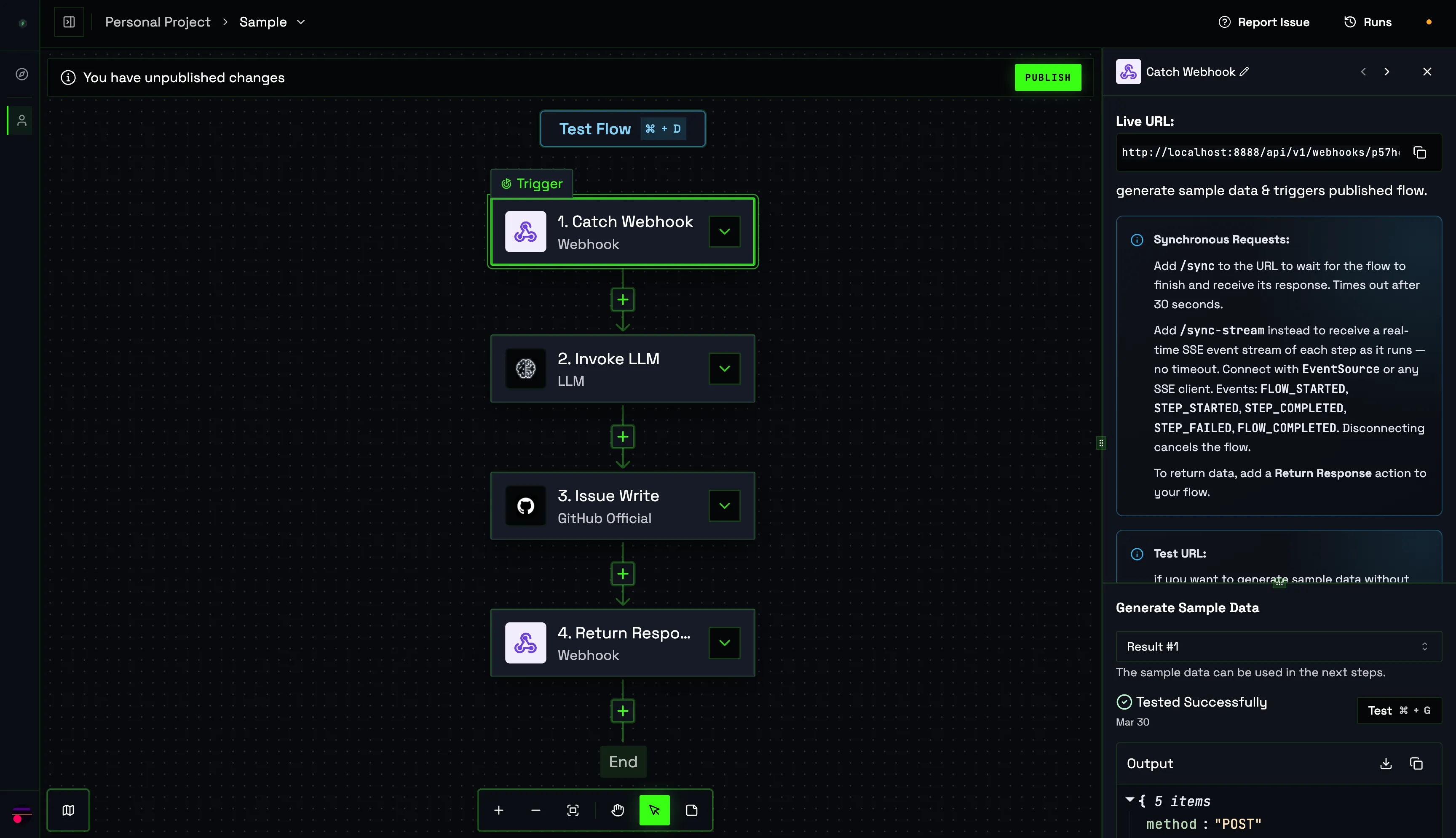
Every flow that starts with a Webhook trigger is instantly a REST endpoint. The caller sends a POST, the base Live URL starts asynchronous work. Append /sync for the Return Response body or /sync-stream for SSE lifecycle events and the final response envelope.
POST → blocks → Response
POST /api/v1/webhooks/{flow-id}/sync
Content-Type: application/json

{ "repo": "acme/backend", "since": "2025-01-01" }

          ↓  Webhook Trigger block receives the body
          ↓  LLM Node: summarise commits
          ↓  GitHub block: create issue
          ↓  Return Response block

HTTP 200
{ "issue_url": "https://github.com/acme/backend/issues/42" }
Flows as an LLM API
You can use Flows as an LLM API by creating a flow with a Webhook Catch trigger which accepts prompt via the request body keep an LLM node after it which takes prompt as input and finally a Return Response node which returns the output. it exactly like any other MCP tool.
curl — call a flow from the terminal
curl -X POST "<LiveUrl in the Webhook Trigger node>/sync" \
  -H "Content-Type: application/json" \
  -d '{
    "prompt": "Summarise the latest changes in the repo"
  }'
Flows as an MCP Server API
You can use Flows as an MCP Server API by creating a flow with a Webhook Catch trigger which accepts the tool call parameters in its body, then keep the tool node and pass the tool call parameters to it and finally a Return Response node which returns the output.
curl — MCP-style call for GitHub issue creation
curl -X POST "<LiveUrl in the Webhook Trigger node>/sync" \
  -H "Content-Type: application/json" \
  -d '{
    "owner": "acme-corp",
    "repo": "backend",
    "title": "Fix memory leak in worker pool",
    "body": "Observed 200 MB/hr growth under load. See attached profile.",
    "labels": ["bug", "performance"]
  }'

# Response
HTTP 200
{ "issue_url": "https://github.com/acme-corp/backend/issues/42" }
Quick Start
- Open the Steroid web UI and navigate to Flows in the left sidebar.
- Click New Flow and select Webhook as the trigger.
- Add Invoke LLM or Invoke Structured LLM — select an advertised IDE/model; the structured action also needs
jsonSchema. - Add a generated MCP piece, for example GitHub
issue_write; provide its exact required inputs and credential properties/connection references. - Use actual internal step names and inspected outputs, for example
{{step_1.output}}for the Invoke LLM FCC response body. A whole-step reference preserves its complete wrapper. - Add a Return Response block and reference any output you want to return to the caller.
- Test with safe real inputs, then publish with a description and manually entered valid-JSON trigger schema. Publication and search indexing are separate outcomes.
WARNING
Agent creation searches for reuse, asks you to approve/revise/reject a plan, resolves credentials, authors a draft, runs real E2E tests and bounded repair, checks acceptance, then publishes/indexes. Failed drafts can remain resumable and acceptance warnings can accompany publication. Tests/retries can repeat external side effects. MCP HTTP calls use 120-second limits with up to two retries; LLM requests use 590 seconds within the configured 600-second flow budget, with 650-second sync wait.