
Steroid_Kit
Steroid Flows›LLM Nodes
LLM Nodes
LLM nodes are the reasoning steps inside a flow. They are the only place where a language model is invoked — other steps have explicit orchestration. External integrations can still have variable results or invoke their own models; do not infer that the whole workflow is deterministic or side-effect-free.
What Is an LLM Node?
An LLM node sends a prompt to a language model, waits for the response, and makes the output available to downstream steps under its actual internal name. For an action named step_1, {{step_1}} is the complete wrapper and{{step_1.output}} is its FCC response body. Inspect that body before selecting deeper fields.
Unlike a Cursor skill — where the LLM controls tool selection and can call multiple tools in a single turn — these actions dispatch a prompt to an installed coding-agent CLI. Use explicit MCP blocks for intended integration actions; do not assume the underlying agent CLI has no other capabilities.
NOTE
Critical difference from skills: In a Cursor conversation the LLM decides which tools to call. In a Flow, the flow definition decides the execution path. The LLM node only transforms data while explicit flow steps define orchestration. Agent/provider execution can still fail or vary.
Model Selection
Each LLM node selects its own model. This lets you use a fast, cheap model for classification steps and a more capable model for generation steps in the same flow.
Capability-driven setup
1. Configure/authenticate a supported coding-agent CLI.
2. Connect the Steroid client and check daemon liveness.
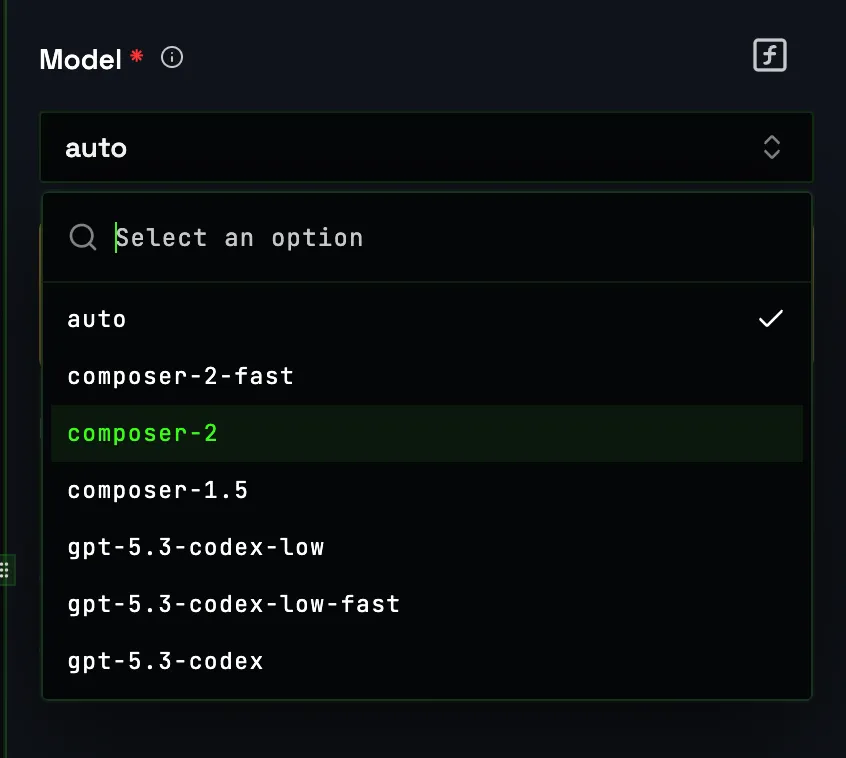
3. Select an advertised IDE, then one of its advertised models.
4. Provide prompt; for structured generation also provide jsonSchema.
Both IDE and model are required dynamic dropdowns. FCC uses daemon-advertised capabilities and routes to an eligible alive client; with multiple machines it selects the oldest eligible poller. Adding provider keys to the Vault does not enable these models. Existing provider authentication, subscriptions and quotas apply; inference is not guaranteed free or unlimited.
Prompt Input
The prompt field supports the same {{variable}} template syntax used everywhere in Steroid Flows. You can reference the trigger body, previous step outputs, or static strings. The final prompt sent to the model is the fully-resolved string after variable substitution.
Example prompt with template variables
You are a senior code reviewer. Your job is to assess pull request risk.

Repository: {{trigger.body.repo}}
PR title:   {{trigger.body.pr_title}}
Author:     {{trigger.body.author}}

Diff:
{{trigger.body.diff}}

Linear ticket (if any):
{{step_1.full_result}}

Assess the risk of this PR. Consider: blast radius, test coverage signals
in the diff, and whether the change is additive or destructive.
Structured Output Mode
Choose the separate Invoke Structured LLM action (invokeStructuredLlm) and supply jsonSchema. Plain invoke_llm has no universal structured-output switch. Parse/validation failures are errors, not proof that every invocation succeeds.
TIP
Use structured output whenever an MCP block consumes the LLM output. Blocks expect typed fields — if the LLM returns freeform prose, variable substitution will inject the raw string into every field. Structured output provides a schema-directed path, but you must inspect the FCC response inside the action wrapper and bind its actual fields. Do not guess a universal summary/labels path.
Structured output schema — PR risk assessment
{
  "type": "object",
  "properties": {
    "risk_level": {
      "type": "string",
      "enum": ["low", "medium", "high", "critical"]
    },
    "summary": {
      "type": "string",
      "description": "One-paragraph human-readable assessment"
    },
    "labels": {
      "type": "array",
      "items": { "type": "string" },
      "description": "GitHub labels to apply"
    },
    "requires_security_review": {
      "type": "boolean"
    }
  },
  "required": ["risk_level", "summary", "labels", "requires_security_review"]
}
Inspect the wrapper before binding nested fields
{{step_1}}         # complete action result
{{step_1.success}} # action success flag on successful return
{{step_1.output}}  # FCC/agent response body

Use a real test result and the data picker for deeper fields.
Single-token references preserve native objects/arrays;
mixed text references serialize non-string substitutions.
Chaining LLM Nodes
You can chain multiple LLM nodes in a single flow, with each node consuming outputs from the previous one. This is useful for multi-stage reasoning: extract → assess → format → summarise. Keep each node focused on a single transformation — small prompts are more reliable than large ones.
4-step LLM pipeline
Step 1 — LLM Node: Extract entities from raw ticket text
          Output: { entities: [...], intent: "..." }

Step 2 — Linear Block: Fetch related tickets using extracted entities

Step 3 — LLM Node: Assess priority given ticket + related context
          Input:  inspect the actual earlier step outputs in the data picker
          Output: { priority: "high", rationale: "..." }

Step 4 — Linear Block: Update ticket priority
Input: priority = the tested structured-response field| Approach | Token cost | Reliability | Debuggability |
|---|---|---|---|
| Single skill (monolithic prompt) | High — all context in one call | Lower — model juggles multiple tasks | Hard — failure point unclear |
| Steroid Flows (chained nodes) | Measure actual prompt/result/retry usage | Explicit orchestration; provider/integration failures remain possible | Inspect step outputs and real test failures |
WARNING
Dispatch can return 503 when no eligible client is available, 400 for an unadvertised IDE/model and 504 on timeout. Invoke LLM requests use 590 seconds within the configured 600-second AP flow budget; provider/agent-specific retry behavior is not a universal three-attempt guarantee.